Star Topology Examples to Simplify Your Network Design

Updated on: 28 January 2026 | 6 min read
Sharesocial-toggle
social-share-facebook
social-share-linkedin
social-share-twitter
Link Copied!
Star Topology Examples to Simplify Your Network Design

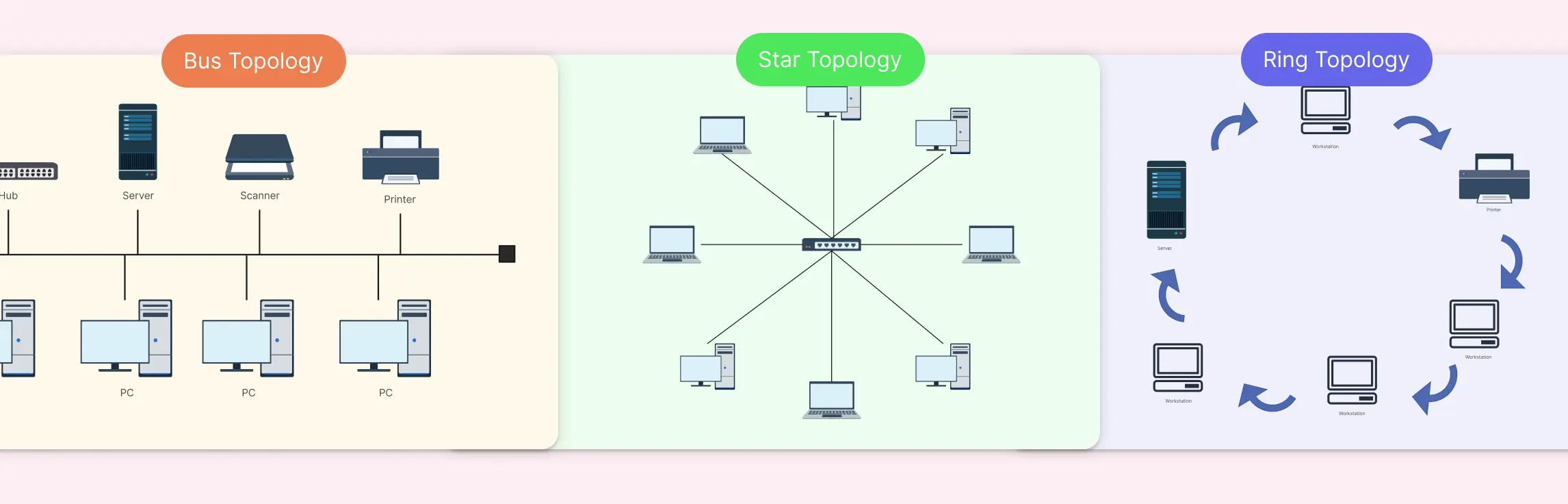
Ever stared at a messy network diagram and felt your head spin? Many teams struggle with scattered connections, confusing layouts, and endless troubleshooting, especially when networks grow beyond a few devices. That’s where a star topology comes in: a simple, organized way to connect devices with a central hub, making your network clear, manageable, and scalable. In this guide, we’ll discuss the different types of star topologies and 10 practical star topology examples that you can explore.

10 Star Topology Examples to Explore

1. Star Topology Using a Switch

A classic star network diagram showing all devices connected to a single central switch. Perfect for small offices or home setups, it highlights simplicity, easy troubleshooting, and quick deployment.
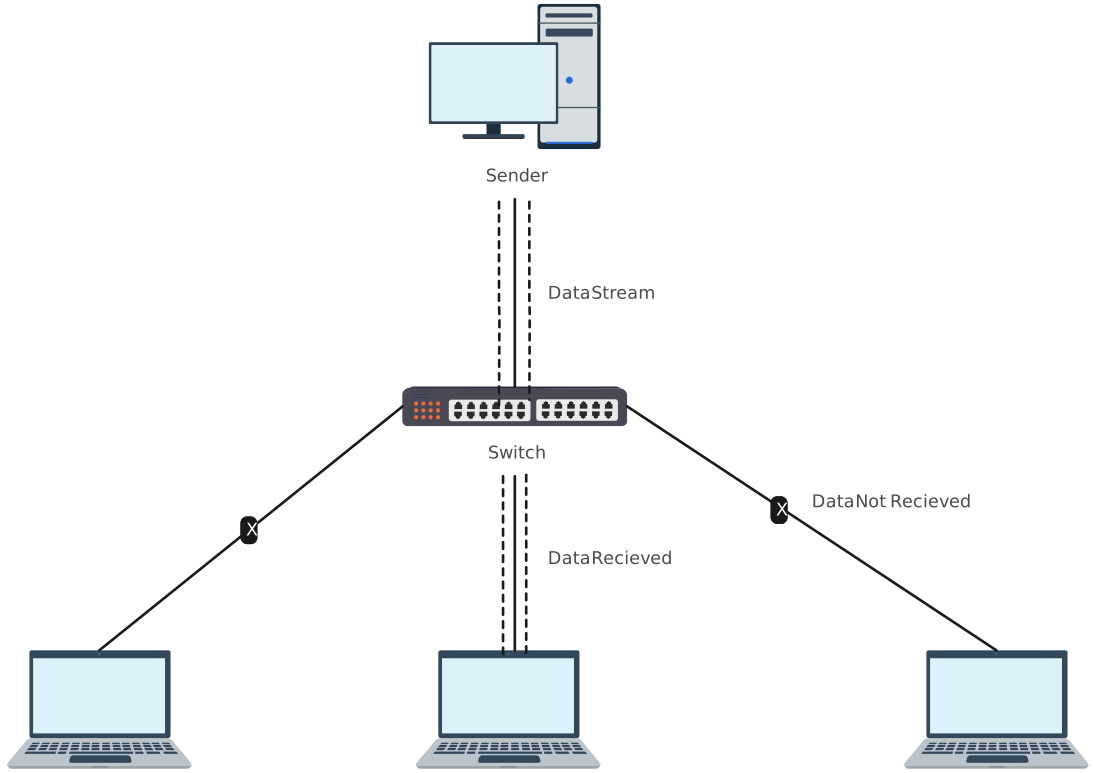
Star topology network diagram using a switch to connect multiple devices in a LAN
Edit this Template
  • Ready to use
  • Fully customizable template
  • Get Started in seconds
exit full-screen Close
Star Topology Using a Switch

2. Simple Extended Star Network Topology

Visualizes multiple small star networks linked through a backbone switch, making it ideal for growing teams or offices spanning multiple rooms or floors. This layout keeps networks organized and scalable.
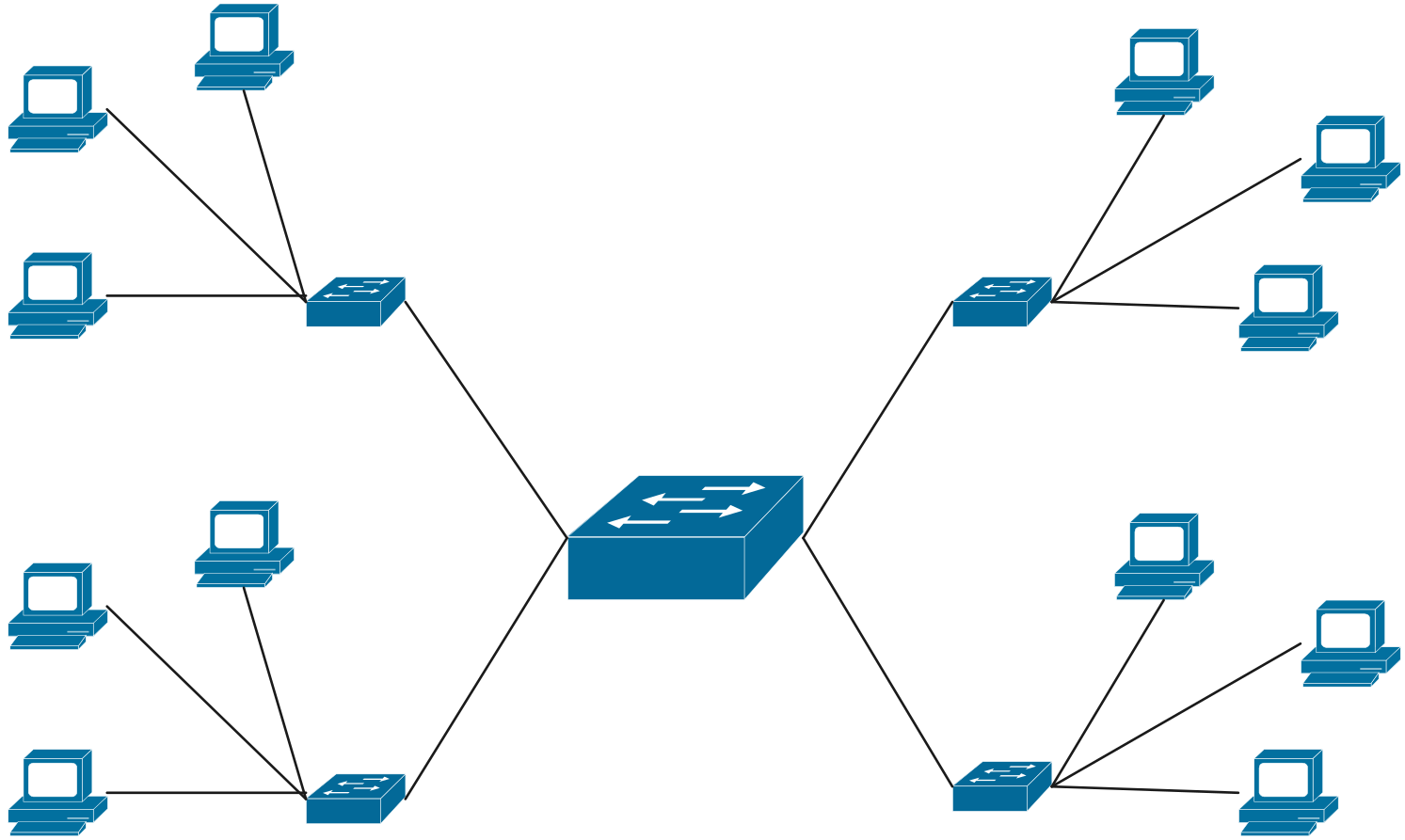
Simple extended star network layout visualizing central switches linking multiple star clusters in a local area network
Edit this Template
  • Ready to use
  • Fully customizable template
  • Get Started in seconds
exit full-screen Close
Simple Extended Star Network Topology

3. Corporate LAN Using Star Topology

Designed for modern office environments, this diagram shows department-level switches connecting to a central hub. It’s perfect for efficient LAN management, minimizing downtime, and keeping large teams connected seamlessly.
Corporate LAN star topology diagram demonstrating efficient centralized data flow and network organization
Edit this Template
  • Ready to use
  • Fully customizable template
  • Get Started in seconds
exit full-screen Close
Corporate LAN Using Star Topology

4. Campus Networks with Extended Star Topology

A detailed star topology template for universities or school campuses, showing how classrooms, labs, and administrative buildings connect to a central backbone. It’s ideal for visualizing hierarchical network structures across multiple locations.
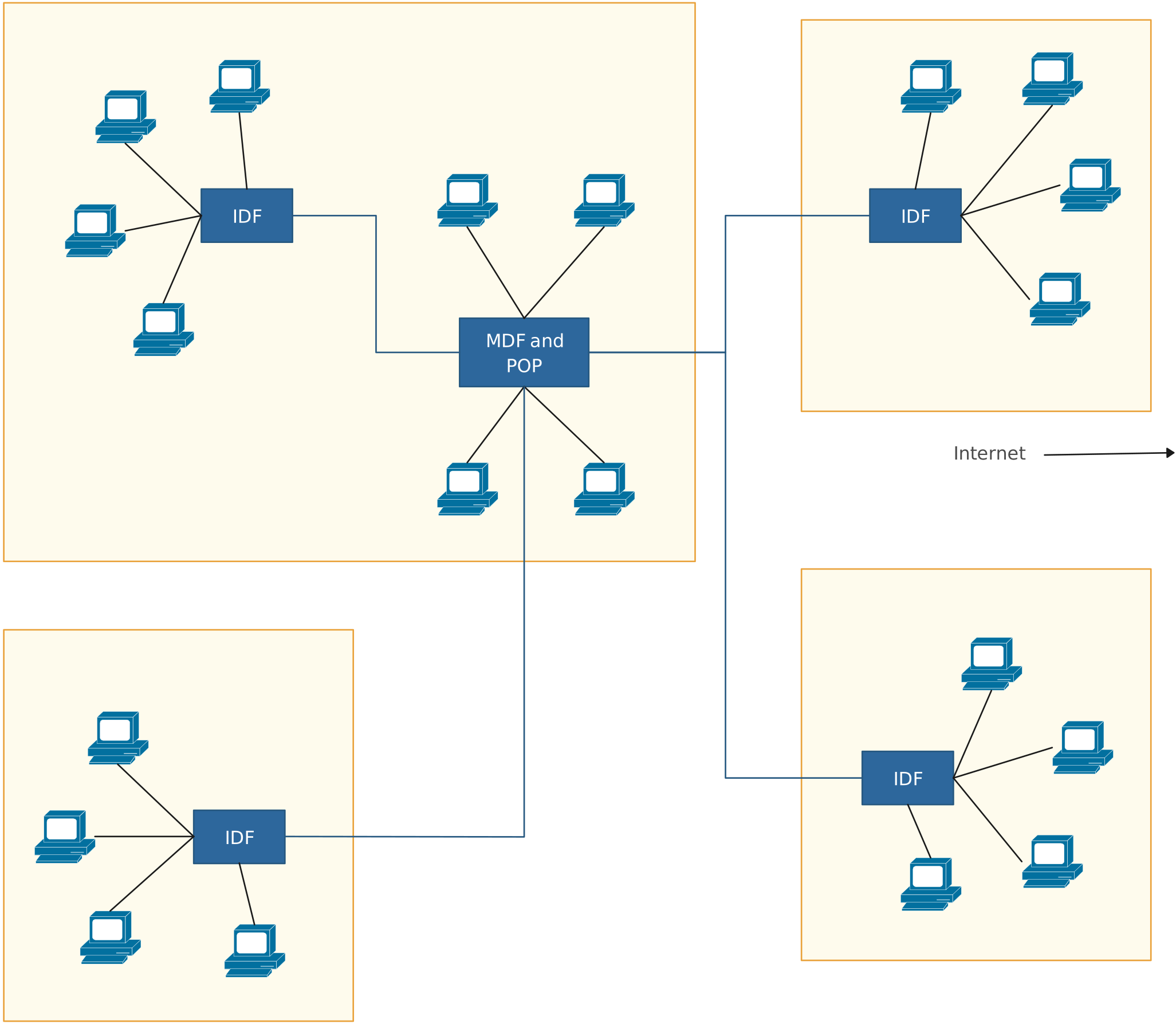
SExtended star topology campus network illustrating hub-and-spoke connections across multiple campus sites
Edit this Template
  • Ready to use
  • Fully customizable template
  • Get Started in seconds
exit full-screen Close
Campus Networks with Extended Star Topology

5. High-Traffic Environments Using Extended Star Network

Built for enterprises or data centers, this template illustrates robust central switches and redundant links to handle high data traffic and critical workloads without network interruptions.
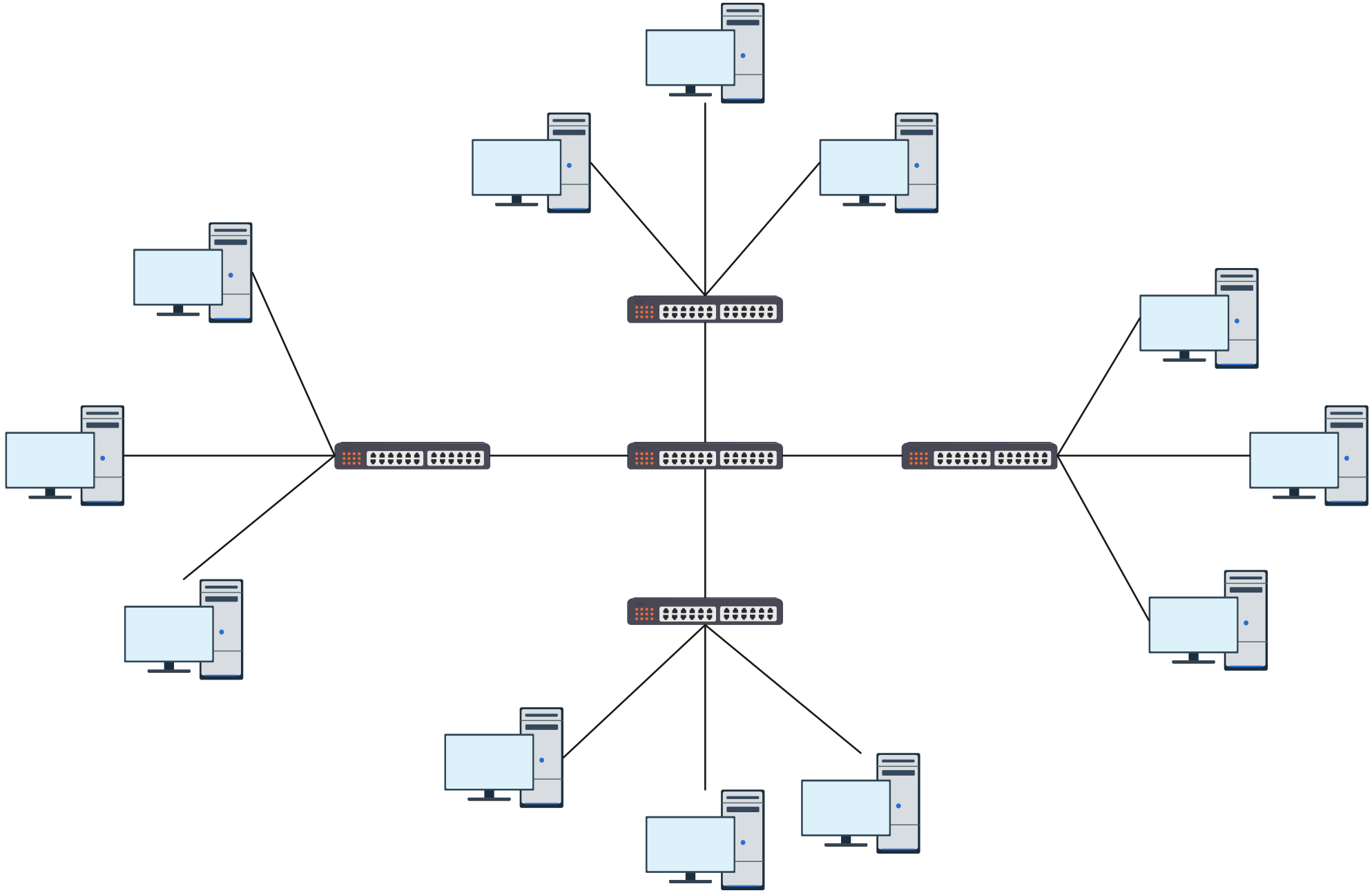
Extended star network layout designed for high-traffic environments with central switches linking multiple star clusters
Edit this Template
  • Ready to use
  • Fully customizable template
  • Get Started in seconds
exit full-screen Close
High-Traffic Environments Using Extended Star Network

6. Hybrid Business Networks with Star Topology

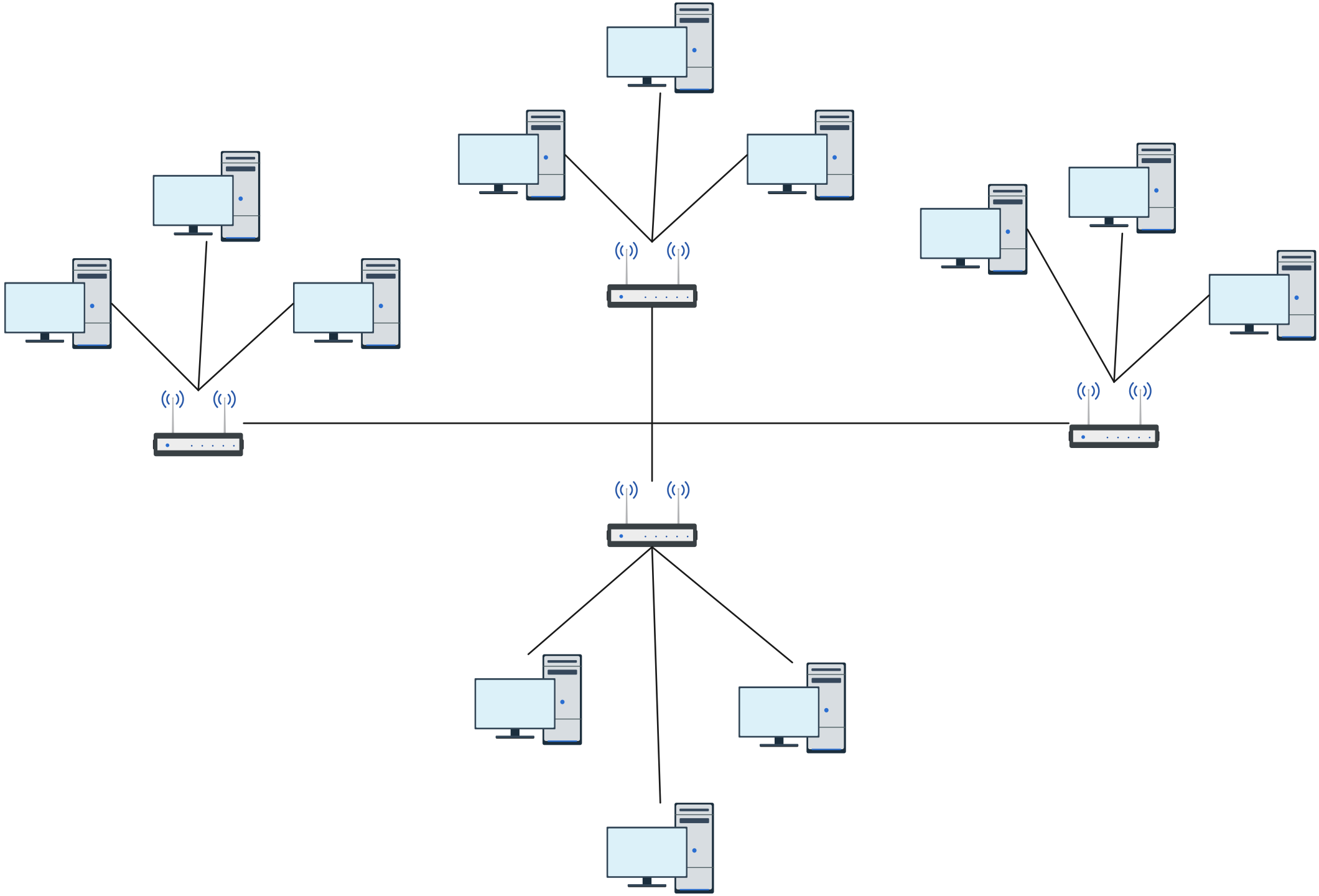
Shows a mix of wired and wireless connections in a corporate environment. This layout makes it easy to manage multiple device types while keeping the network organized, scalable, and ready for modern hybrid workflows.
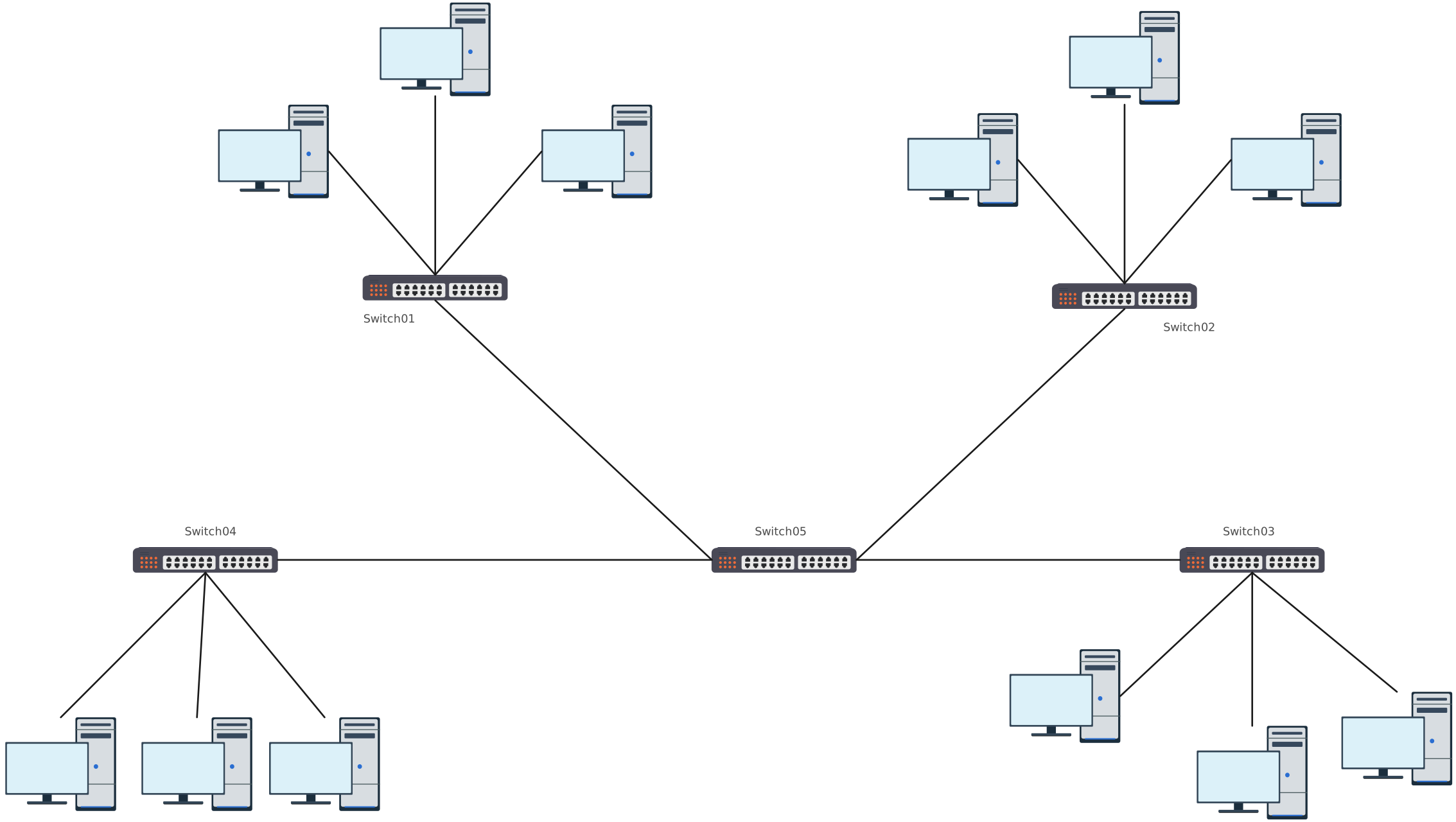
Hybrid business network layout with extended star topology visualizing scalable hub-and-spoke connections for multiple departments
Edit this Template
  • Ready to use
  • Fully customizable template
  • Get Started in seconds
exit full-screen Close
Hybrid Business Networks with Star Topology

7. Home Wi-Fi Star Topology Network Diagram

A friendly, visual layout of a home network, where all devices connect to a central router or access point. Perfect for planning, troubleshooting, or optimizing your Wi-Fi setup.
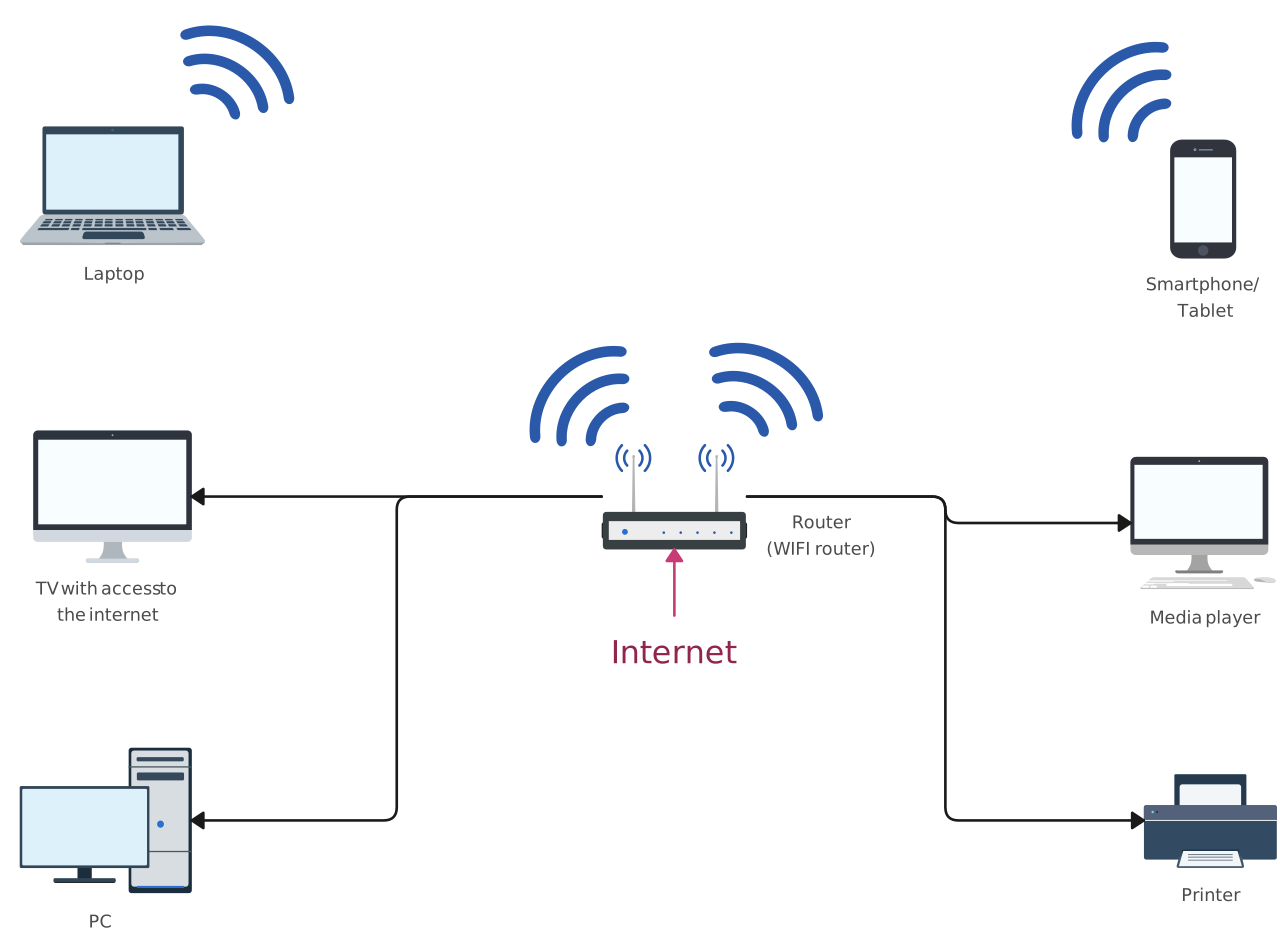
Home Wi-Fi network diagram using star topology showing multiple devices connected to a central wireless router
Edit this Template
  • Ready to use
  • Fully customizable template
  • Get Started in seconds
exit full-screen Close
Home Wi-Fi Star Topology Network Diagram

8. CCTV System Star Topology Network Diagram

Maps a security camera network with all cameras connecting to a central DVR or NVR hub. Great for monitoring, managing devices, and quickly identifying network issues.
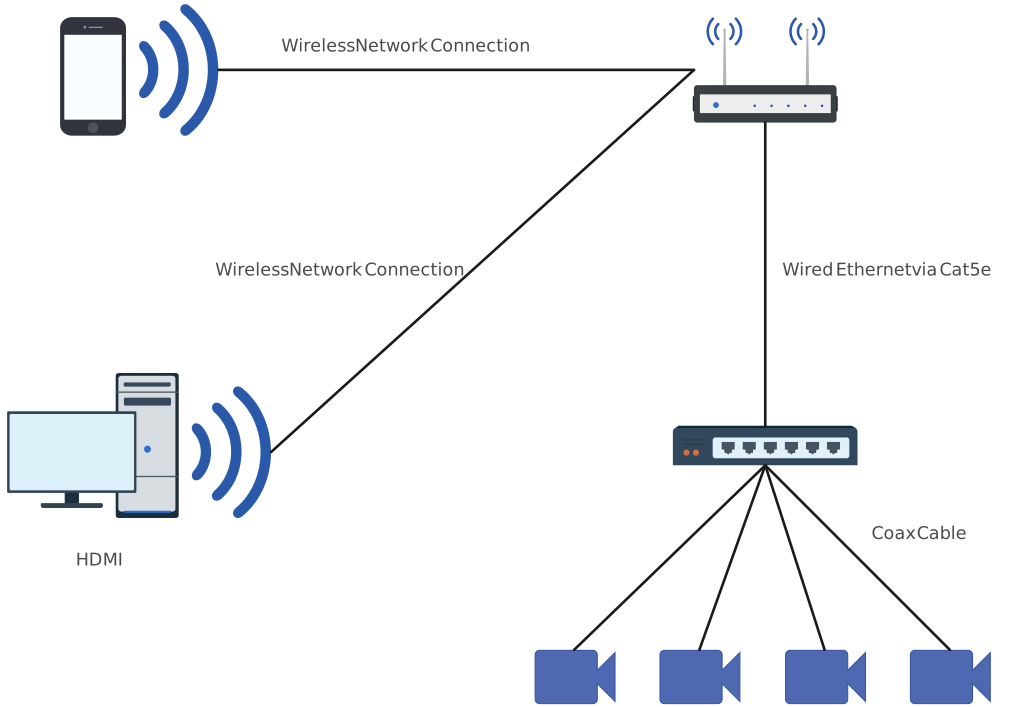
CCTV system network diagram using star topology, showing multiple cameras connected to a central hub for surveillance
Edit this Template
  • Ready to use
  • Fully customizable template
  • Get Started in seconds
exit full-screen Close
CCTV System Star Topology Network Diagram

9. Public Hotspot Star Topology Network Diagram

Illustrates a public Wi-Fi setup, such as in cafes, airports, or libraries, where multiple users connect to a single hotspot. Ideal for planning coverage, managing traffic, and ensuring secure connectivity.
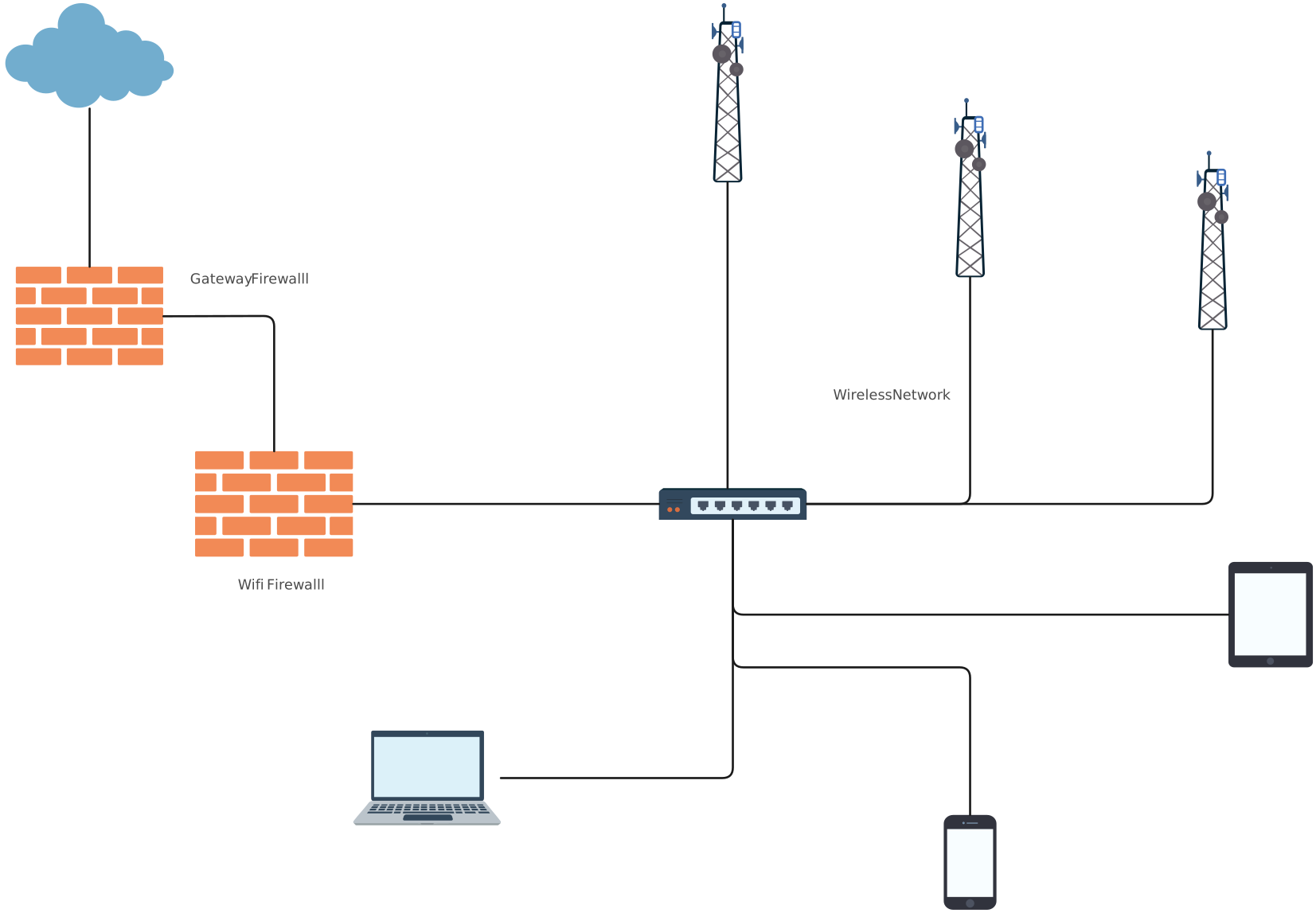
Public hotspot star network diagram demonstrating centralized wireless connectivity for multiple users in a shared space
Edit this Template
  • Ready to use
  • Fully customizable template
  • Get Started in seconds
exit full-screen Close
Public Hotspot Star Topology Network Diagram

10. VoIP Phone System Topology Diagram

Visualizes a voice-over-IP network, where all IP phones link to a central server or PBX. Perfect for organizing call routing, reducing downtime, and maintaining seamless communication.
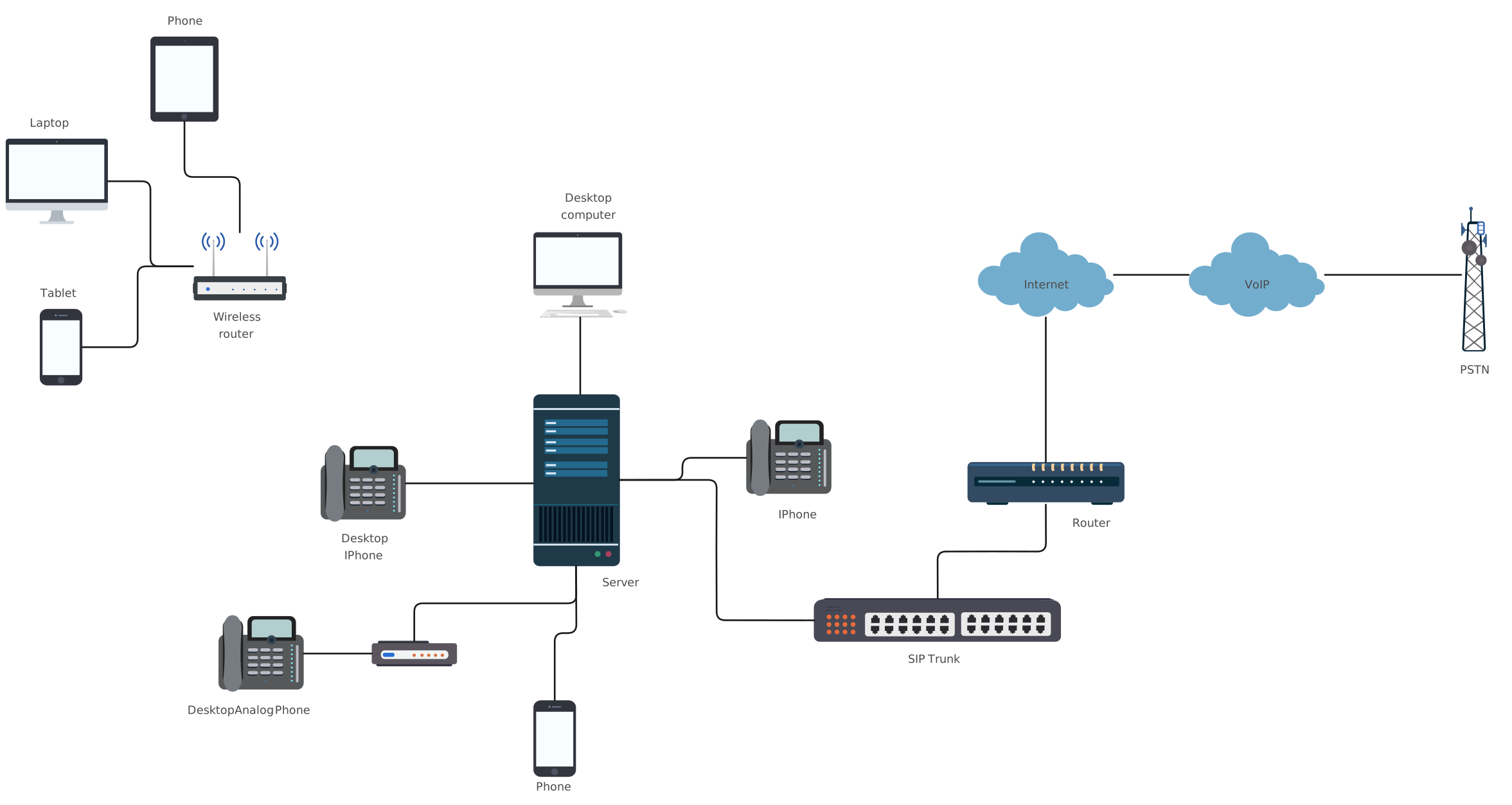
VoIP topology diagram illustrating star or hybrid connections between office phones, switches, and central VoIP server
Edit this Template
  • Ready to use
  • Fully customizable template
  • Get Started in seconds
exit full-screen Close
VoIP Phone System Topology Diagram

More Network Diagram Templates

A well-planned star topology can transform a messy, hard-to-manage network into a clean, easy-to-control system. From small home setups to large enterprise campuses, the examples and templates in this guide show how versatile and scalable star networks can be. Stop wasting time with confusing diagrams. Try Creately today and see how simple, clear, and visual network planning can be. Your network (and your team) will thank you.

Helpful Resources

Learn how to draw a network diagram step by step, from planning what to include to laying out components clearly and choosing the right symbols.

Discover key bus topology diagram elements, highlight common design patterns, and point out the limitations you need to account for when working with this topology.

Understand how to approach Cisco network topology diagrams with confidence and create visuals that are practical, accurate, and easy to understand.

Learn how to create a home network setup diagram step by step, understand common layouts, follow practical best practices, and use free templates to map your setup.

Discover how to create a wide area network diagram step by step, understand key components, WAN examples, and follow proven best practices.

Explore what hybrid topology diagrams are, the hybrid types & examples, highlight advantages and disadvantages, provide a step-by-step creation process, and best practices.

Everything you need to know about LANs, from the basics and key components to network types, advantages, and best practices.

‌‌

FAQs About Star Topology Diagram Examples

What is the importance of star topology in LANs?

Star topology provides predictable wiring, centralized monitoring, and easy device addition, making it ideal for small to medium LANs. Its structured layout simplifies troubleshooting and keeps your network organized.

Is Wi‑Fi a star topology?

Logically, yes. Wireless clients connect to a central access point or router, forming a star structure. Physically, clients aren’t cabled spokes, so it’s important to document both physical uplinks and logical client associations for clarity.

How do I make my star topology diagram effective for troubleshooting?

Include IP addresses, VLANs, port labels, link speeds, and status indicators. Keep physical and logical layouts separate and embed an asset table with device owner/contact info. This makes troubleshooting faster and reduces confusion.

When should I use a hybrid instead of a pure star?

Hybrid star designs are best when you need redundancy or scaling across multiple racks or floors. For example, an extended or distributed star with a backbone, or even partial mesh links for critical devices, ensures resilience without losing star topology simplicity.

What tools help draw star topology diagrams?

A tool like Creately, which offers network templates, metadata support, and collaboration features, makes creating and maintaining star topology diagrams fast and accurate. Features like @mentions, editable templates, secure sharing options, and version history save time and keep teams aligned.

Author
Yashodhara Keerthisena
Yashodhara Keerthisena Technical Communication Specialist

Yashodhara Keerthisena crafts strategic content at Creately, focusing on diagramming frameworks, technical diagramming, business workflow, and visual collaboration best practices. With a deep interest in structured thinking and process design, she turns complex concepts into actionable insights for teams and knowledge workers. Outside of work, Yashodhara enjoys reading and expanding her understanding across a wide range of fields.

View all posts by Yashodhara Keerthisena →
Leave a Comment